Search This Blog

Showing posts with label vijaydr. Show all posts

Wednesday, February 6, 2019

Stock Market Walk Though - Weekly Expiry - 07-02-19

1. Bank Nifty Weekly Expiry
2. RBI policy announcement is there today and there is a little chance to impact the market.
3. If any rate cut is happens, then that will impact the bank nifty expiry and becomes volatile
4. BN will be in the range of 27000 - 27650 and more chances to close in down side 27200 - 27300 & up side 27350 -27500, coz max pain at 27300.
5. BN daily charts in bullish and it formed like spinning TOP, so take trade after the HIGH or LOW breakouts.
6. MACD & DMA 50,200 golden crossover signal shows the bullish trend,


TRADE WITH CAUTION,


My Trade Plan

 1. BN - Stradle, Strangle [depends]
 2. LOTS - Confidential*


HAPPY TRADING
Vijay


Friday, November 8, 2013

JBOSS 7 :: InvalidMappingException Unable to read XML readMappingDocument

In standalone.xml

Remove/Modify
*************


Add
***


Thursday, November 7, 2013

Jbpm web application JBoss

Simple Eclipse project which creates a deployable web app which contains all the basics to run JBPM 5.4 inside a web app ussing persistence. The project is deployed in a JBoss AS 7.1.1 server which was created using the JBPM 5.4 installer. This project uses PostgreSQL as the database. The JBPM process is read from a local Guvnor instance.

This example was created by combining a few other existing examples together and then adding some stuff I've figured out along the way.

Anyway, hopefully this will help get people going using JBPM in thier own web apps.

Here are the instructions which are also found in the web apps home page:

  1. Install your jdbc drivers into your JBoss AS installation. (I did mine as a module following this.)
  2. Create a new empty database/schema called "testJBPM" in your database with permissions for a user "jbpm" and password "jbpm". (If you are not using PostgreSQL or want to change the connection information, update jbpm-in-webapp-ds.xml)
  3. Create a new package in Guvnor called "testPackage". (Change the URL in KBaseService and the packageName in ScriptTeask.bpmn if you want to use a different package name)
  4. Create a pojo model jar containing HelloService.java and Person.java the and deploy it to the testPackage inside guvnor. (From eclipse basically select the 2 files and do "Export->Java->Jar file. Name it whatever and upload it to Guvnor")
  5. Upload ScriptTask.bpmn to Guvnor in the same package.
  6. Build the testPackage in Guvnor (Click "Build package" button in the edit tab))
  7. Deploy this web app to your jboss server (The needed tables will be built in your database because "hibernate.hbm2ddl.auto" is set to "update" in persistence.xml)
  8. Go to http://localhost:8080/jbpm-in-webapp/
Download src : https://community.jboss.org/servlet/JiveServlet/download/48240-1-75921/jbpm-in-webapp.zip
 

Eclipse plug-in Installation for jBPM5

Here are the manual steps to install jBPM5 plug-in and run a sample example in Eclipse.This install is done automatically after running jBPM5 installer. Following procedure, however, might be useful if you want to understand (or having problems completing the install) the main install steps provided in the automated install script for JBPM5.2. The install instructions for the previous release 5.1 can also be found in the attachment jbpm5.1install.zip.

1.) Download Eclipse Helios:
http://download.eclipse.org/technology/epp/downloads/release/helios/SR2/eclipse-java-helios-SR2-win32.zip

Unzip this into a directory, say JBPM5

2.) Download Drools and JBPM5 plugin, i.e., org.drools.updatesite-5.3.1.Final-assembly.zip:
https://repository.jboss.org/nexus/content/repositories/releases/org/drools/org.drools.updatesite/5.3.1.Final/org.drools.updatesite-5.3.1.Final-assembly.zip


Unzip this plugin to a temp directory, say TEMP\drools-update-site. Copy 'features' and 'plugins' directories from TEMP\drools-update-site into
JBPM5\eclipse

It is required to have a runtime dependant libraries that a jBPM5 sample can use.

3.) Download the libraries (jbpm-5.2.0.Final-bin.zip ) from http://sourceforge.net/projects/jbpm/files/jBPM%205/jbpm-5.2.0.Final/jbpm-5.2.0.Final-bin.zip/download and unzip into a directory, say JBPM5\runtime.

4.) Create a new jBPM sample project in Eclipse and use the runtime libraries downloaded in Step 4.

Install JBPM in Eclipse

jBPM 5 application using a simple Hello World project in combination with the Eclipse jBPM plugin.

jBPM 5 can be freely downloaded from sourceforge here.
jBPM 5 is basically distributed in two formats: the jbpm-5.X.X.Final-installer-full.zip which includes really lots of stuff (including the core libraries, the JBoss AS, the Eclipse plugins and the Web application consoles) and the jbpm-5.X.X.Final-bin.zip which contains just the jBPM 5 libraries and thus it's good for distributing it in production.

For the purpose of learning we will download the latest jbpm-5.X.X.Final-installer-full.zip which contains all the stuff needed to learn jBPM. Once downloaded unzip the package in a folder of your preference.
  You need to have Jakarta ant installed in order to continue
Ok now you can get started in two ways:

1# Option: Installing all the components contained in the package using:
 
ant install.demo     
2# Option: If you want to install the component step by step you will understand better the role of every single component of jBPM 5. Here's how to do it:

You need to have Eclipse Indigo installed in order to continue
Now open the file build.properties which is used by ant and specify the path where Eclipse is installed:
For example, if you have installed Eclipse into C:\
# the home of your eclipse installation will be 
# used to deploy the Eclipse plugin to
eclipse.home=C:\\eclipse
Ok, now we will install the jBPM Eclipse plugin with the following ant command:
ant install.droolsjbpm-eclipse.into.eclipse
And then we will install the jBPM runtime:
ant install.jBPM.runtime

Creating your first jBPM 5 project:

Good, that's all to get started. Now start Eclipse and create a new jBPM project:
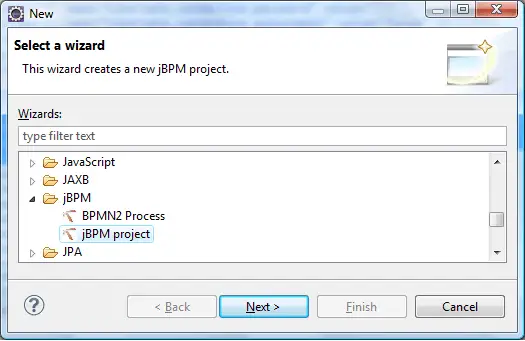
jbpm 5 tutorial jboss example
In this tutorial we will see a basic hello world process, (in the next one e will show how to deal with of human tasks and data persistence).
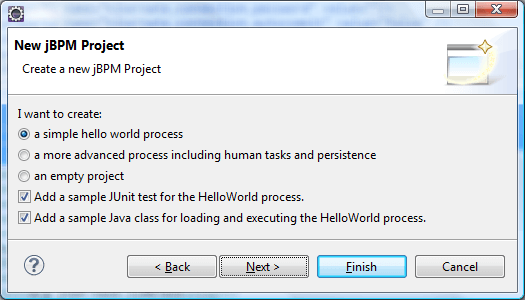
jbpm 5 tutorial jboss example
Next you need to specify where your jBPM runtime environment has been installed (If you have unpacked the jbpm-installer in C:\ it will be C:\jbpm-installer\runtime)
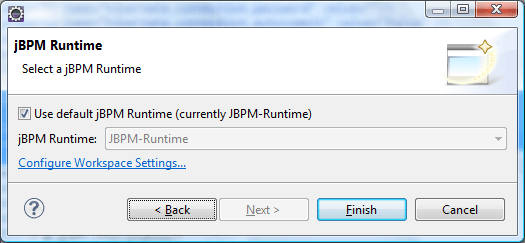
jbpm 5 example jboss jbpm5
Ok. Now Eclipse shows your first jBPM5 project which contains barely:
  • A ProcessMain class which creates and starts a process bound to the sample.bpmn file
  • A ProcessTest which can be used for unit testing the ProcessMain class
  • A sample.bpmn resource which is our first process written in BPMN 2.0
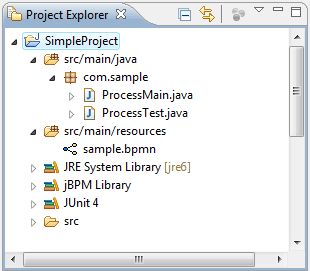
jbpm 5 tutorial jboss example
By clicking on the sample.bpmn file, the BPMN 2 process editor will be activated:
As you can see this process contains a start node, an end node and a Script task named "Hello".
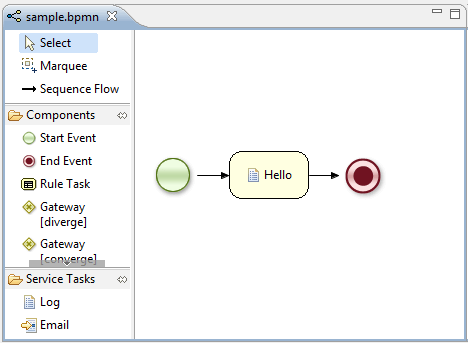
jbpm 5 tutorial jboss example
A Script Task represents a script that should be executed in this process. The associated action specifies what should be executed, the dialect used for coding the action (i.e., Java or MVEL), and the actual action code. This code can access any variables and globals. When a Script Task is reached in the process, it will execute the action and then continue with the next node.

By clicking on the "Properties" tab, in the lower part of your IDE, you can see the Action which is associated to the process.

jbpm 5 tutorial jboss example
As it is, when you run the ProcessMain, a simple "Hello world" message will display on the console.
Let's make it a bit more interesting: Right click on the "Action" of your node, where the [..] button is displayed. This will let you redefine your action. Specify the following action in the Textual editor:
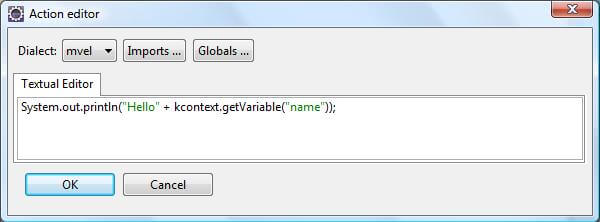
jbpm 5 tutorial jboss example
The predefined variable kcontext  references the ProcessContext object (which can, for example, be used to access the current ProcessInstance or NodeInstance, and to get and set variables, or get access to the ksession using kcontext.getKnowledgeRuntime()

Now modify your ProcessMain class, so that the process is started with an HashMap containing the process variables initial value:
01.public class ProcessMain {
02. 
03.public static final void main(String[] args) throws Exception {
04.// load up the knowledge base
05.KnowledgeBase kbase = readKnowledgeBase();
06.StatefulKnowledgeSession ksession = kbase.newStatefulKnowledgeSession();
07. 
08.Map params = new HashMap();
09. 
10.params.put("name", "Arthur");
11. 
12.// start a new process instance
13.ksession.startProcess("com.sample.bpmn.hello",params);
14.}
15. 
16.private static KnowledgeBase readKnowledgeBase() throws Exception {
17.KnowledgeBuilder kbuilder = KnowledgeBuilderFactory.newKnowledgeBuilder();
18.kbuilder.add(ResourceFactory.newClassPathResource("sample.bpmn"), ResourceType.BPMN2);
19.return kbuilder.newKnowledgeBase();
20.}
21. 
22.}

Ok, we have just instructed jBPM to start a process and into the Script task, to display the "name" process variable. Verify it by running the ProcessMain class.

Saturday, October 26, 2013

Basic Hacker Skills

When people think of hackers they immediately think of the worst but there are many different types of hackers and most of them has done a great deal to improve and develop software, the Internet and electronic devices.

Hacking skills - You must have the patience and will to understand programming languages. There are dozens of programming languages and they have evolved through the years, so start out with learning the basics. You can begin learning the programming language C then progress to other languages like Pascal or Fortran. Then move on to learning Perl, XHTML and other programs used on the Internet.

Understanding computer hardware is also a must as well as all the components that a computer system needs. You need to understand banking systems, and other systems used in the financial world because this is where you'll learn the kinds of security that are in place to protect the system and its clients.

Security Audit Stages

Stage 1. Automation Auditing
Stage 2. Manual Auditing

Automation Tools:-

1. AppScan
2. Scando
3. Acunetix
etc..

Manual Testing Tools:-

1. Burp Suite
2. IE Tamper
3. Achilles
etc..


How to prevent via coding ?   [Project should implement the following points]:-

Auto Completion for important controls like password
Salted hash for password fields
Sanitization to all the input controls
Browser Refresh [use captcha]
Steal Password via Refresh or back button [use redirection, clear cache]
Session Fixation [ use new session id before/after login ]
Brute Force [use captcha]
Guessing UserID
Always clear Browser cache
Insecure direct object reference  [ in search result screens, avoid give action link with pk id ]
CSRF
Downloading Secure File [ dont take a path from parameter ]
Inproper Error Handling [use proper tr{} catch{}, move to custom error page]
XSS [use sanitization, check server side validation (type,size,input data) ]
SQL Injection [use sanitization]
Cross Account Access
Privileged Escalation
Login Trail
Audit Trail
Forgot Password [use security question, captcha, send a mail link to change password (one time link) ]
etc..

Fraud Detection on Web App


Prerequisites

Before jumping into ways to detect potential fraud in Web applications and services, we need to set a few ground rules. Number one, and most important, you must have adequate logging. For full coverage on appropriate logging, read “How to Do Application Logging Right.”1 At a minimum, consider the five types of logging events covered

• authentication, authorization, and access events;
• changes to the system, application, or data;
• availability issues;
• resource issues;

Impossible Travel
Let’s say you saw the two entries shown in Figure 2 in your logs. These entries show that someone accessed login.jsp twice (let’s assume the same  user and that you have those details in the logs) in two hours. At 10 a.m., an IP address in California accessed  it; at noon, someone in Romania accessed it. The quick math says that no one could travel from California to Romania in two hours, even in an SR-71.
HTTP Request
Looking beyond the User-Agent header, what has changed?
• The order of headers differs.
• The order of cookies differs.
• The headers differ. Only the
first request has Origin and Cache-Control; only the second request has Keep-Alive.
• Regarding Accept-Encoding, only the first request lists each.
•  regarding Accept-Language, the first request has en-US and q=0.8, whereas the second request has en-us and q=0.5.
Fraud Detection in Sessions :- Its like session hacking / session fixation.

Hit Counter


View My Stats