Search This Blog

Friday, December 18, 2009

Logger in JSP

Apply log4j within jsp.


Information
none

Operating system used
Windows XP Home Edition Version 5.1 SP 2

Software prerequisites
Tomcat
Jakarta log tag library
Log4j 1.2.9


Procedure

1. Download the Jakarta log tag library: jakarta-taglibs-log-1.0.zip

2. Extract this archive file, e.g.: C:\Tools\jakarta-taglibs-log-1.0

The archive contains the following files:

LICENSE
log-doc.war
log-examples.war
README
taglibs-log.jar
taglibs-log.tld

3. Download Log4j 1.2.9: logging-log4j-1.2.9.zip

4. Extract this archive file, e.g.: C:\Tools\logging-log4j-1.2.9

The archive contains serveral files. The most important one is: C:\Tools\logging-log4j-1.2.9\dist\lib\log4j-1.2.9.jar

5. Install Tomcat. Follow guide "Installing Tomcat 4.1.31".

6. Create a simple a Tomcat web application called "demo":

* Create the following directories inside the Tomcat "webapps" directory:

C:\Tools\Tomcat 4.1\webapps\demo
C:\Tools\Tomcat 4.1\webapps\demo\WEB-INF
C:\Tools\Tomcat 4.1\webapps\demo\WEB-INF\classes
C:\Tools\Tomcat 4.1\webapps\demo\WEB-INF\lib

* Copy the tag library descriptor file "taglibs-log.tld" into WEB-INF.

* Copy the tag library JAR file "taglibs-log.jar" into WEB-INF/lib.

* Copy the log4j JAR file "log4j-1.2.9.jar" into WEB-INF/lib.

* Create a web.xml file in the WEB-INF directory:


PUBLIC "-//Sun Microsystems, Inc.//DTD Web Application 2.2//EN"
"http://java.sun.com/j2ee/dtds/web-app_2_2.dtd">


Demonstration log4j usage in jsp

index.jsp


http://jakarta.apache.org/taglibs/log-1.0
/WEB-INF/taglibs-log.tld


Note: You MUST add a element in the web.xml file:


http://jakarta.apache.org/taglibs/log-1.0
/WEB-INF/log.tld


* Create a log4j.properties file in the WEB-INF/classes directory:

# ***** Set root logger level to DEBUG and its two appenders to stdout and R.
log4j.rootLogger=debug, stdout, R

# ***** stdout is set to be a ConsoleAppender.
log4j.appender.stdout=org.apache.log4j.ConsoleAppender
# ***** stdout uses PatternLayout.
log4j.appender.stdout.layout=org.apache.log4j.PatternLayout
log4j.appender.stdout.layout.ConversionPattern=%d [%c] %p - %m%n

# ***** R is set to be a RollingFileAppender.
log4j.appender.R=org.apache.log4j.RollingFileAppender
log4j.appender.R.File=${catalina.home}/logs/demo.log
# ***** Max file size is set to 100KB
log4j.appender.R.MaxFileSize=100KB
# ***** Keep one backup file
log4j.appender.R.MaxBackupIndex=1
# ***** R uses PatternLayout.
log4j.appender.R.layout=org.apache.log4j.PatternLayout
log4j.appender.R.layout.ConversionPattern=%d [%c] %p - %m%n

Note:
The location of the log file is set in:
log4j.appender.R.File=${catalina.home}/logs/demo.log


* Create two jsp files in the C:\Tools\Tomcat 4.1\webapps\demo directory:

File 1: index.jsp

<%@ taglib uri="http://jakarta.apache.org/taglibs/log-1.0" prefix="log" %>


Demonstration log4j usage in jsp


Show DEBUG message.
Show INFO message.
Show WARN message.
Show ERROR message.
Show FATAL message.


Message embedded within the open and close tags.


Using category attribute.


The log messages are shown in the Tomcat console and in the
${catalina.home}/logs/demo.log file.


File 2: test.jsp

<%@ page import="org.apache.log4j.Logger" %>


Demonstration log4j usage in jsp


<%
Logger log = Logger.getLogger("com.mobilefish.demo.test");
log.debug("Show DEBUG message");
log.info("Show INFO message");
log.warn("Show WARN message");
log.error("Show ERROR message");
log.fatal("Show FATAL message");
%>


The log messages are shown in the Tomcat console and in the
${catalina.home}/logs/demo.log file.


7. (Re)start Tomcat.

8. Access the index.jsp file:

http://localhost:8080/demo/index.jsp

9. The following log messages are shown in the Tomcat console and in the ${catalina.home}/logs/demo.log file.

2006-06-03 17:28:43,379 [root] DEBUG - Show DEBUG message.
2006-06-03 17:28:43,409 [root] INFO - Show INFO message.
2006-06-03 17:28:43,409 [root] WARN - Show WARN message.
2006-06-03 17:28:43,409 [root] ERROR - Show ERROR message.
2006-06-03 17:28:43,419 [root] FATAL - Show FATAL message.
2006-06-03 17:28:43,419 [root] FATAL - Message embedded within the open and close tags.
2006-06-03 17:28:43,419 [root] FATAL - Message passed as an attribute to the tag
2006-06-03 17:28:43,419 [com.mobilefish.demo.index] FATAL - Using category attribute.

10. Access the test.jsp file:

http://localhost:8080/demo/test.jsp

11. The following log messages are shown in the Tomcat console and in the ${catalina.home}/logs/demo.log file.

2006-06-03 17:55:43,379 [com.mobilefish.com.test] DEBUG - Show DEBUG message.
2006-06-03 17:55:43,409 [com.mobilefish.com.test] INFO - Show INFO message.
2006-06-03 17:55:43,409 [com.mobilefish.com.test] WARN - Show WARN message.
2006-06-03 17:55:43,409 [com.mobilefish.com.test] ERROR - Show ERROR message.
2006-06-03 17:55:43,419 [com.mobilefish.com.test] FATAL - Show FATAL message.

12. Change the root logger level to WARN in the log4j.properties file and restart Tomcat:

log4j.rootLogger=warn, stdout, R

When the index.jsp page is reloaded in your browser only the following messages are shown:

2006-06-03 17:48:43,409 [root] WARN - Show WARN message.
2006-06-03 17:48:43,409 [root] ERROR - Show ERROR message.
2006-06-03 17:48:43,419 [root] FATAL - Show FATAL message.
2006-06-03 17:48:43,419 [root] FATAL - Message embedded within the open and close tags.
2006-06-03 17:48:43,419 [root] FATAL - Message passed as an attribute to the tag
2006-06-03 17:48:43,419 [com.mobilefish.demo.index] FATAL - Using category attribute.

Monday, December 14, 2009

Different between jdk 1.1 to jdk 1.4 jdk 1.5 jdk 1.6

JDK 1.0 (january 23, 1996) oak
- Initial release


JDK 1.1 (february 19, 1997)
- Retooling of the AWT event model
- Inner classes added to the language
- JavaBeans
- JDBC
- RMI


J2SE 1.2 (December 8, 1998)

This and subsequent releases through J2SE 5.0 were rebranded retrospectively Java 2 & version name "J2SE"
(Java 2 platform, Standard edition) replaced JDK to distinguish the base platform from
J2EE (java 2 platform, enterprise edition) and J2ME (java 2 platform, micro edition).

- Strictfp keyword
- Reflection
- Swing api integration into the core classes
- JVM equipped with a jit compiler
- Java plug-in
- Java IDL
- An IDL implementation for corba interoperability
- Collections Framework


J2SE 1.3 (may 8, 2000)

- Hotspot jvm included
- JavaSound
- JNDI included in core libraries
- Java platform debugger architecture (jpda)
- RMI was modified to support optional compatibility with corba


J2SE 1.4 (february 6, 2002)
- assert keyword
- Regular expressions
- Exception chaining (allows an exception to encapsulate original lower-level exception)
- Internet protocol version 6 (IPV6) support
- Non-blocking nio (new input/output)
- Logging API
- Image i/o api for reading and writing images in formats like jpeg and png
- Integrated XML parser and XSLT processor (JAXP)
- Integrated security and cryptography extensions (JCE, JSSE, JAAS)
- Java web start


J2SE 5.0 (september 30, 2004) tiger [originally numbered 1.5]
- Generics: provides compile-time (static) type safety for collections and eliminates the need for most typecasts (type conversion).
- Metadata: also called annotations; allows language constructs such as classes and methods to be tagged with additional data, which can then be processed by metadata-aware utilities.
- Autoboxing/unboxing: automatic conversions between primitive types (such as int) and primitive wrapper classes (such as integer).
- Enumerations: the enum keyword creates a typesafe, ordered list of values (such as day.monday, day.tuesday, etc.). Previously this could only be achieved by non-typesafe constant integers or manually constructed classes (typesafe enum pattern).
- Swing: new skinnable look and feel, called synth.
- Var args: the last parameter of a method can now be declared using a type name followed by three dots (e.g. Void drawtext(string... Lines)). In the calling code any number of parameters of that type can be used and they are then placed in an array to be passed to the method, or alternatively the calling code can pass an array of that type.
- Enhanced for each loop: the for loop syntax is extended with special syntax for iterating over each member of either an array or any iterable, such as the standard collection classesfix the previously broken semantics of the java memory model, which defines how threads interact through memory.
- Automatic stub generation for rmi objects.
- Static imports concurrency utilities in package java.util.concurrent.
- Scanner class for parsing data from various input streams and buffers.
- Assertions
- StringBuilder class (in java.lang package)
- Annotations


Java SE 6 (december 11, 2006)
sun replaced the name "J2SE" with java se and dropped the ".0" from the version number.
Beta versions were released in february and june 2006, leading up to a final release that occurred on december 11, 2006.
The current revision is update 14 which was released in may 2009.

- Support for older win9x versions dropped.
- Scripting lang support: Generic API for integration with scripting languages, & built-in mozilla javascript rhino integration
- Dramatic performance improvements for the core platform, and swing.
- Improved web service support through JAX-WS JDBC 4.0 support
- Java compiler API: an API allowing a java program to select and invoke a java compiler programmatically.
- Upgrade of JAXB to version 2.0: including integration of a stax parser.
- Support for pluggable annotations
- Many GUI improvements, such as integration of swingworker in the API, table sorting and filtering, and true swing double-buffering (eliminating the gray-area effect).


Java se 6 update 10

A major enhancement in terms of end-user usability.
- Java Deployment Toolkit, a set of javascript functions to ease the deployment of applets and java web start applications.
- Java Kernel, a small installer including only the most commonly used jre classes. Enhanced updater.
- Enhanced versioning and pack200 support: server-side support is no longer required.
- Java quick starter, to improve cold start-up time.
- Improved performance of java2D graphics primitives on windows, using direct3D and hardware acceleration.
- A new Swing look and feel called NIMBUS and based on synth.
- Next-generation java plug-in: applets now run in a separate process and support many features of web start applications.


Java se 6 update 12
This release includes the highly anticipated 64-bit java plug-in (for 64-bit browsers only), windows server 2008 support,
and performance improvements of java and JAVAFX applications.

Friday, November 6, 2009

Differences between Spyware Adware Malware


Adware:
Adwares are software applications that are supported by advertisements (Advertising Software). It automatically display advertisement when the software is running. It is one of the way a programmer can offer his application at a reduce cost or even for free. Most of the time, a license can be bought to remove the advertisement permanently.

Spyware:
Spywares are a progression from adwares. In order to provide the user of adwares with more targeted advertisements, various forms of statistics and information on user's activity on the system is tracked and sent to advertising companies. Sometimes these are done under the hood without user's knowledge and consent. Like spying on your habits and activities on your computer. Thus the term spying software.

Malware:
Malware are malicious software that affects the normal functionality of your system. Sometimes, annoying pop up will appear out of no where to direct you to some sales sites. Sometimes emails spams will automatically be sent from your system. Adware and spyware progress to a malicious state if it start to affect the use of your system actively instead of just showing you passive advertisement.

Wednesday, October 7, 2009

Design Pattern

design pattern is a general reusable solution to a commonly occurring problem in software design. A design pattern is not a finished design that can be transformed directly into code. It is a description or template for how to solve a problem that can be used in many different situations. Object-oriented design patterns typically show relationships and interactions between classes or objects, without specifying the final application classes or objects that are involved.

Design Pattern Types
Creational
Structural
Behavioral
Concurrency


creational design patterns are design patterns that deal with object creation mechanisms, trying to create objects in a manner suitable to the situation. The basic form of object creation could result in design problems or added complexity to the design. Creational design patterns solve this problem by somehow controlling this object creation.


structural design patterns
are design patterns that ease the design by identifying a simple way to realize relationships between entities.

behavioral design patterns are design patterns that identify common communication patterns between objects and realize these patterns. By doing so, these patterns increase flexibility in carrying out this communication.


concurrency patterns
are those types of design patterns that deal with multi-threaded programming paradigm.

Tuesday, October 6, 2009

TIPS

Ants Problem:
Keep the skin of cucumbers near the place or ant hole.


To get pure and clean ice:

Boil water first before freezing.

To make the mirror shine:
Clean with spirit

To remove chewing gum from clothes:
Keep the cloth in the freezer for an hour.

To whiten white clothes
Soak white clothes in hot water with a slice of lemon for 10 minutes 10


To give a shine to hair:

Add one teaspoon of vinegar to hair, then wash hair.

To get maximum juice out of lemons:
Soak lemons in hot water for one hour, and then juice them.


To avoid smell of cabbage while cooking:

Keep a piece of bread on the cabbage in the vessel while cooking.


To rid the smell of fish from your hands:

Wash your hands with a little apple vinegar.

To avoid tears while cutting onions:
Chew gum.

To boil potatoes quickly:
Skin one potato from one side only before boiling.

To boil eggs quickly:
Add salt to the water and boil.

To check freshness of fish:
Put it in a bowl of cold water. If the fish floats, it's fresh.

To check freshness of eggs:
Put the egg in water. If it becomes horizontal, it's fresh. If it becomes slanting, its 3-4 days old. If it becomes vertical, its 10 days old. If it floats, it's stale.


To remove ink from clothes:

Put toothpaste on the ink spots generously and let it dry completely, then wash.


To skin sweet potatoes quickly:

Soak in cold water immediately after boiling.

To get rid of mice or rats:
Sprinkle black pepper in places where you find mice or rats. They will run away.

To get rid of mosquitoes at night:
Keep leaves of mint near your bed or pillows and in around the room.

Tuesday, September 29, 2009

Best Sentance

Effective leadership is putting first things first. Effective management is discipline, carrying it out.

A cardinal principle of Total Quality escapes too many managers: you cannot continuously improve interdependent systems and processes until you progressively perfect interdependent, interpersonal relationships.

Every human has four endowments- self awareness, conscience, independent will and creative imagination. These give us the ultimate human freedom... The power to choose, to respond, to change.

In the last analysis, what we are communicates far more eloquently than anything we say or do.

It's a fact that more people watch television and get their information that way than read books. I find new technology and new ways of communication very exciting and would like to do more in this field.

Live out of your imagination, not your history.

Management is efficiency in climbing the ladder of success; leadership determines whether the ladder is leaning against the right wall.

Our character is basically a composite of our habits. Because they are consistent, often unconscious patterns, they constantly, daily, express our character.

Public behavior is merely private character writ large.

The key is not to prioritize what's on your schedule, but to schedule your priorities.

The main thing is to keep the main thing the main thing.

There are three constants in life... change, choice and principles.

We are not animals. We are not a product of what has happened to us in our past. We have the power of choice.

We are not human beings on a spiritual journey. We are spiritual beings on a human journey.

We are the creative force of our life, and through our own decisions rather than our conditions, if we carefully learn to do certain things, we can accomplish those goals.

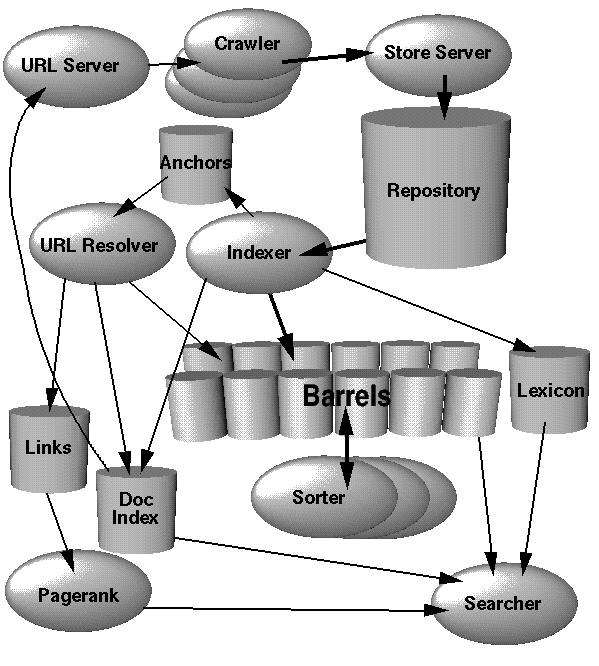
How Google Search Works..

Google Architecture Overview


process


1. Parse the query.
2. Convert words into wordIDs.
3. Seek to the start of the doclist in the short barrel for every word.
4. Scan through the doclists until there is a document that matches all the search terms.
5. Compute the rank of that document for the query.
6. If we are in the short barrels and at the end of any doclist, seek to the start of the doclist in the full barrel for every word and go to step 4.
7. If we are not at the end of any doclist go to step 4.

Sort the documents that have matched by rank and return the top k.

Monday, September 21, 2009

HOW TO BEHAVE IN OFFICE/WORK

HOW TO BEHAVE IN OFFICE/WORK

Attitude makes a lot of difference. If you have a good attitude with required
skills, you are the winner. The following tips may help you.

 Be humble and polite to your co-workers and others.
 Do not criticize anyone. That is not your job.

 Always be professional and do not take any thing personal.
 Be friendly with your opposite sex colleagues and do not get involved
in any sexual litigation

 Do not break the client dress code. It is not a good idea to go to the
office in jeans and sneakers even if they have a casual dress code.
 Light cologne is fine but do not use strong perfume.

 Do not talk loudly when you talk over the phone or to your colleagues.
Talk in a soft and clear voice.
 If you have any dental problems, make a dental appointment with your
dentist. If dental problems go unchecked, they lead to embarrassing
situations involving bad breath. Have breath mints, chewing gum or
peanuts in your desk. Check your breath before talking to your
colleagues personally.

 Wear fresh and neat clothes.
 Always be punctual.

 Complete your assigned task within the time frame. Do not postpone it.
 Do not talk about politics and religion in the office premises.

 If you are invited for a happy hour party or any party try to attend it at
least for some time. That is the best place to know more about your
colleagues.

 Do not play music loudly.
 Be as easy going. Do not get the "tough guy" label.
 Attend meetings regularly.

 Be enthusiastic.
 Try to be helpful to your co-workers.
 Be a good listener. Do not interrupt when someone else is talking.

 Discuss but do not argue.
 Do not lose your credibility


Some tips on behaving in Office
HOW TO BEHAVE AT THE OFFICE TO ADVANCE
YOUR CAREER

Workplace etiquette involves more than just saying “please” and “thank
you.” When you come to work you, step into a place where being polite
involves a greater expanse of responsibility and thoughtfulness.
When considering different forms of concrete career advice such as how to
present projects to your boss or get ahead, never forget the basics of
working with others. The best career advice you may get will be how to
behave when working in small spaces such as offices. No one wants to
work with someone who cannot follow the unspoken rules of the
workplace.

Read the following tips to ensure that you aren’t committing any of these
workplace no-no’s.
 Taking Long Breaks – Few things annoy coworkers or supervisors more
than someone who takes extra-long lunch or smoking breaks. If you can
avoid smoking at work altogether, you should. People who do not
smoke may become resentful of the extra time you take to indulge.
When you go out to lunch, make sure you take only the allotted time.
Stretching the time you spend away from your desk makes you look like
you avoid hard work, no matter how productive you are.

 Coming in Late, Leaving Early – No one likes someone who shirks his or
her duties. Even if you complete all of your tasks, you should stay at
work the required amount of time. Coworkers are quick to notice
someone who comes in late and leaves a little early. If you have trouble
getting to work on time, talk to your supervisor about your tardy bad
habit. Always put in at least as much time as the other people in your
workplace, if not more. Be on time and leave on time.

 Talking Loudly – It is not just what you say, it’s how you say it. Try to
keep your conversations between you and the person on the other
end. Everyone at work is trying to do the same thing you are – get his or
her job done. It is hard to concentrate when someone nearby continues
to disrupt the workplace atmosphere with loud conversations, both on
and off the phone. Monitor yourself and your voice. If you know that
you tend to be loud, make a concerted effort to keep it quiet.
 Making a Mess – Your desk should be kept as clean as possible, but
your personal workspace is minor compared to the shared spaces that
are reserved for use by everyone. When you use a conference room or
break area, always clean up after yourself. It is frustrating for those
around you to discover the remains of your salad on the table in the
lunchroom.

 Leave Home at Home – Though everyone occasionally must deal with
personal emergencies at work, do your best to leave what is meant for
home at home. If you have children, do not permit them to call you
constantly at the office. Your coworkers will notice and it will likely bother
some of them because it shows that your concentration is not centered
on your tasks and that you take company time for personal issues. The
same rule goes for friends and adult family members. Finally, try to avoid
scheduling doctor appointments or paying bills while at work.

 Think Before you speak – This rule applies to many workplace etiquette
breaches. For example, do not complain about your supervisor in the
lunch area, where he or she may overhear. This faux pas could result in
uncomfortable situations. Similarly, do not gossip about coworkers.
Tensions could easily result. When it is time to talk to your boss about
your progress or evaluation, do so in an appropriate setting, such as a
closed office. You never want to blurt out something that you will regret in
front of the entire office.

 Control your Emotions – It seems that younger employees struggle with
this issue more often. Issues at work may arise from time to time that elicit
strong reactions from you or those around you. Minimize any emotional
response you may have at work. Remember that constructive criticism is
meant to help you and is not personal. Strong emotions may make you
appear out of control, which is an undesirable workplace trait.

 Edit your Email – Review the company email policy and adhere to it. Do
not forward email messages that you receive from friends and family to
coworkers. Never send religious or political emails to people in the office;
it could make people uncomfortable. Do not gossip about or discuss
other people in email, as emails can be sent accidentally to the wrong
person or be intercepted by management. If you do not want others to
read what you have to say, do not send it in an email. Email is a
powerful tool and should be respected, not abused.


HOW TO BEHAVE IN OFFICE: WORKPLACE
ETIQUETTE TIPS

At the workplace one really needs to mind one’s manners. Everyone
around you is noticing your every move and you don’t want to get the title
of the boorish one in office. There are unwritten laws in the office that one
must follow whether it is India or anywhere in the world.
First of all hold the door open for ladies and the boss or your older
colleagues. If you are walking past the door first ensure that you do not
leave the door because it will bang into the person coming in behind you.
If you have just joined the office, then follow the behavior of the others. Be
observant and follow what the others are doing.

Secondly, never ever ask personal questions. It is not the accepted thing
professionally. There are times when you might be tempted or out of habit
wanting to do so. But, hold yourself back from it or else you will be avoided
like the plague by your colleagues every time they see you around. You
don’t want to be clubbed the nosy parker.

Remember that people are proud of their names and identify them with it. If
you want to build up rapport try and address the person by their name.
Make it a point to take extra care and effort to pronounce their name
correctly. Try out handy little tricks to remember the person’s name.
Associate with some trait of the person and you will not forget the name the
next time you meet them. Also be careful of the title. Always, address ladies
with Ms. (pronounced as miss). If you are unsure of their marital status this
is a safe thing to do. Never use the first name and the title for instance if the
person’s name is Vivienne Smith, it is wrong to address her as Ms. Vivienne.
The right way is Ms. Smith or Vivienne if you know her well or she has
given you the permission to address her by her first name.

Whenever you encounter anyone be it in the corridor or office or the
elevator greet them with a pleasant and genuine smile. If you know your
colleagues then greet them with a customary good morning or hello.
Always ensure that you use these three words liberally. They are please,
thank you and sorry. Of course apologize only when you need to and not
again and again or else you will sound insincere.

Learn to use your voice discreetly, whether you are talking face to face or
over the phone. No one wants to hear your personal or professional
conversations and get disturbed. Keep your voice low and if you need to
speak loudly get up and move out.

Remember to wear a smile to work every day. It does not cost you
anything but will go on to enlighten the place and add cheer. Also try to
follow some eating etiquette while enjoying your food at office during your
job.

If you are the last person to leave the room, switch off the lights and the air
conditioner and same with your workstation. Once you have finished for
the day make it a point to switch it off.

Thursday, September 17, 2009

Steps Ruby on Watir

step 1:

install ruby first : [ruby 186-27]
http://rubyforge.org/frs/download.php/47082/ruby186-27_rc2.exe

For ex:
you install in c:/ruby

place mouse pointer on my computer -> right click -> properties -> advance -> environment variables ->
select path [ edit ] add at last
;c:\ruby\bin;

step 2:
Open command prompt by click Start -> run -> cmd
cd\
cd c:\ruby

step 3:
type : "gem install watir" to install watir

c:\ruby> gem install watir


step 4:
create a file with extension .rb , for ex: sample.rb
save it in c:\ruby
go to that dir and type

step 5:
type to run ruby filename.rb

c:\ruby>ruby sample.rb


here is the sample code , open note pad and paste this code "red color text's" and save as sample.rb
which can run google.co.in and type in text box and click search button

require 'watir'
require 'test/unit'

class TC_article_example < Test::Unit::TestCase
def test_search
browser = Watir::Browser.new
browser.goto("http://www.google.com/ncr")
browser.text_field(:name, "q").set("pickaxe")
browser.button(:value, "Google Search").click
assert(browser.text.include?("Programming Ruby: The Pragmatic Programmer's Guide"))
end
end


ex link
http://www.secretgeek.net/watir_3mins.asp
http://showmedo.com/videotutorials/video?name=7580000&fromSeriesID=758

Tuesday, September 15, 2009

some interesting time management statistics

Emphasising the huge significance and opportunities in time management, a 2007 survey by the Proudfoot Consulting (Guardian 22 Oct 07) covering 2,500 businesses over four years and 38 countries, indicated that wasted time costs UK businesses £80bn per year, equivalent to 7% of GDP. The causes of wasted time - labour inefficiency in other words - were:

* inadequate workforce supervision (31%)
* poor management planning (30%)
* poor communication (18%)
* IT problems, low morale, and lack or mismatch of skills (21%)

Clearly organisations are vastly under-utilising their people, and could be doing a lot more to enable more efficient working.

These failings of organisation and leadership make it all the more important for individual people to think creatively about time management, and particularly to start making changes to improve time management at a personal individual level.

Hit Counter


View My Stats