Search This Blog

Showing posts with label Browser Refresh - OWASP. Show all posts

Wednesday, September 29, 2010

Source Code Analysis Tools

From OWASP

Source Code Analysis tools are designed to analyze source code and/or compiled version of code in order to help find security flaws. Ideally, such tools would automatically find security flaws with a high degree of confidence that what is found is indeed a flaw. However, this is beyond the state of the art for many types of application security flaws. Thus, such tools frequently serve as aids for an analyst to help them zero in on security relevant portions of code so they can find flaws more efficiently, rather than a tool that simply finds flaws automatically.

Open Source or Free Tools Of This Type

  • FindBugs - Find Bugs (including some security flaws) in Java Programs
  • FxCop (Microsoft) - FxCop is an application that analyzes managed code assemblies (code that targets the .NET Framework common language runtime) and reports information about the assemblies, such as possible design, localization, performance, and security improvements.
  • PMD - PMD scans Java source code and looks for potential code problems (this is a code quality tool that does not focus on security issues)
  • PreFast (Microsoft) - PREfast is a static analysis tool that identifies defects in C/C++ programs
  • RATS (Fortify) - Scans C, C++, Perl, PHP and Python source code for security problems like buffer overflows and TOCTOU (Time Of Check, Time Of Use) race conditions
  • SWAAT - Simplistic Beta Tool - Languages: Java, JSP, ASP .Net, and PHP
  • Flawfinder Flawfinder - Scans C and C++

Commercial Tools from OWASP Members Of This Type

These vendors have decided to support OWASP by becoming members. OWASP appreciates the support from these organizations, but cannot endorse any commercial products or services.

Monday, June 21, 2010

OWASP - Improper Error Handling DAO

Every piece of information an attacker receives about a targeted system or application is a valuable weapon. It is the job of application designers and programmers to keep these weapons from the hands of the enemy. Unfortunately, many Web applications cannot handle errors and, as a result, improper error handling occurs.
Because they contain valuable debugging information, error messages are intended for those who figure out and fix problems. Trouble arises when end users see these messages and use the information to solicit an attack. Here are four ways error messages can create security problems:
1. Many default messages divulge basic information about a system. This information, which may be presented as part of the message or inferred from the format, aids the attacker in selecting which techniques and exploits will help him gain access.
2. Attackers can use error messages to extract specific information from a system.
Example 1: If an attacker attempts to break in by brute force, error messages that include specifics, such as "invalid user name" or "invalid password" are more valuable than if they received a generic message, such as "Login incorrect."
Example 2: Attackers can determine which directories or files exist on a given Web server if it distinguishes between "directory or file not found" and "you are not authorized to see this directory or file." To prevent this, redirect them to the homepage, which will confound some automated attack tools.
Example 3: Errors that supply the full path name to executables, data files and other system assets help the attacker understand how things are laid out behind the firewall. In some cases, they reveal hosts of interest as well.
Example 4: Database errors can be especially helpful to attackers, providing them with host names of internal systems, as well as database, table and field names that can be used to craft SQL injection attacks.
3. Attackers can also use unexpected errors to knock an application off line, creating a denial-of-service attack. These attacks are created by taking advantage of error conditions that consume system resources, such as CPU and disk.
4. In a worst-case scenario, unexpected errors can provide an attacker with a buffer or stack overflow condition that sets the stage for an arbitrary code execution.
TIPS:-
So, what is a programmer to do? Do not rely on the operating system, server, database or other underlying packages to provide error handling. All errors should be handled by code the programmer writes. A well-designed application should include handlers for anticipated error conditions and a failsafe error handler for unanticipated conditions.
Error handlers should capture relevant, detailed information in a secure log for future analysis and present users with a generic error message that does not contain sensitive information. When designing the log file, keep security in mind. It should capture information such as user identifiers, IP addresses, dates and times for pattern analysis.
Having an error log is not enough, however. Someone will need to look at the log and analyze its contents. Many application-level reconnaissance and attacks can be detected by looking for patterns in log files. If a log file shows many error conditions falling through to the default exception handler, it may be time to update the error-handling code to deal with other conditions.
These best practices require the application designer and programmer to think like an attacker. When designing an error message, stop and think about whether it is presenting information the user shouldn't see or that an attacker could use.
Owners of Internet-based services and businesses are at war with those who seek to attack their applications -- don't give them additional information and weapons by saving a little time on error handling!

while (DoSomething()) {
try {
/* perform main loop here */
}
catch (Exception &e){
/* do nothing, but catch so it'll compile... */

//ERROR can log into AUDIT TRAIL with Type : ERROR

}
}


<!--
1. add this tags in web.xml
2. create "error.jsp" like below
3. add the audittrail statement in all your catch {} block like below
-->


<error-page>
<error-code>500</error-code>
<location>/error.jsp</location>
</error-page>
<error-page>
<error-code>400</error-code>
<location>/error.jsp</location>
</error-page>
<error-page>
<error-code>401</error-code>
<location>/error.jsp</location>
</error-page>
<error-page>
<error-code>402</error-code>
<location>/error.jsp</location>
</error-page>
<error-page>
<error-code>403</error-code>
<location>/error.jsp</location>
</error-page>
<error-page>
<error-code>404</error-code>
<location>/error.jsp</location>
</error-page>
<error-page>
<exception-type>java.lang.Throwable</exception-type>
<location>/error.jsp</location>
</error-page>
<error-page>
<exception-type>javax.faces.FacesException</exception-type>
<location>/error.jsp</location>
</error-page>
<error-page>
<exception-type>java.io.EOFException</exception-type>
<location>/error.jsp</location>
</error-page>


//error.jsp [you can design your custom error page]
//*********************************************************************************************

Error Contact Administrator
<a href="./homeOrindex.jsp">Home</a> <!-- the page should be redirect to your home or index page according to your decision -->


//catch {} block general format
//*********************************************************************************************

DOAuditTrail doaudittrail = new DOAuditTrail("userId here", "ipAddress here", "ERROR" , "description here"), "status here", "session id here" );
PDOAuditTrail.auditTrailDAO(doaudittrail);

//when ever you need to view this details, create a view and make a select query and display

Tuesday, June 15, 2010

SQL Injection or Insertion

A SQL injection attack consists of insertion or "injection" of a SQL query via the input data from the client to the application. A successful SQL injection exploit can read sensitive data from the database, modify database data (Insert/Update/Delete), execute administration operations on the database (such as shutdown the DBMS), recover the content of a given file present on the DBMS file system and in some cases issue commands to the operating system. SQL injection attacks are a type of injection attack, in which SQL commands are injected into data-plane input in order to effect the execution of predefined SQL commands.

Incorrectly filtered escape characters

This form of SQL injection occurs when user input is not filtered for escape characters and is then passed into an SQL statement. This results in the potential manipulation of the statements performed on the database by the end user of the application.

The following line of code illustrates this vulnerability:
statement = "SELECT * FROM users WHERE name = '" + userName + "';"
This SQL code is designed to pull up the records of the specified username from its table of users. However, if the "userName" variable is crafted in a specific way by a malicious user, the SQL statement may do more than the code author intended. For example, setting the "userName" variable as
' or '1'='1
renders this SQL statement by the parent language:
SELECT * FROM users WHERE name = '' OR '1'='1';


Preventing SQL injection

~~~~~~~~~~~~~~~~~~~~~~~~~

Parameterized statements

With most development platforms, parameterized statements can be used that work with parameters (sometimes called placeholders or bind variables) instead of embedding user input in the statement. In many cases, the SQL statement is fixed, and each parameter is a scalar, not a table. The user input is then assigned (bound) to a parameter. This is an example using Java and the JDBC API:

PreparedStatement prep = conn.prepareStatement("SELECT * FROM USERS WHERE USERNAME=? AND PASSWORD=?");
prep.setString(1, username);
prep.setString(2, password);
prep.executeQuery();

Enforcement at the database level

Currently only the H2 Database Engine supports the ability to enforce query parameterization.However, one drawback is that query by example may not be possible or practical because it's difficult to implement query by example using parametrized queries.

Enforcement at the coding level

Using object-relational mapping libraries avoids the need to write SQL code. The ORM library in effect will generate parameterized SQL statements from object-oriented code.

Escaping

A straight-forward, though error-prone, way to prevent injections is to escape characters that have a special meaning in SQL. The manual for an SQL DBMS explains which characters have a special meaning, which allows creating a comprehensive blacklist of characters that need translation. For instance, every occurrence of a single quote (') in a parameter must be replaced by two single quotes ('') to form a valid SQL string literal. In PHP, for example, it is usual to escape parameters using the function mysql_real_escape_string before sending the SQL query:

$query = sprintf("SELECT * FROM Users where UserName='%s' and Password='%s'",
                  mysql_real_escape_string($Username),
                  mysql_real_escape_string($Password));
mysql_query($query);
This is error prone because it is easy to forget to escape a given string.

TIPS:-
1. Sanitize or Escape special characters
2. Bind or PreparedStatement
3. Check Length and type

Sunday, June 13, 2010

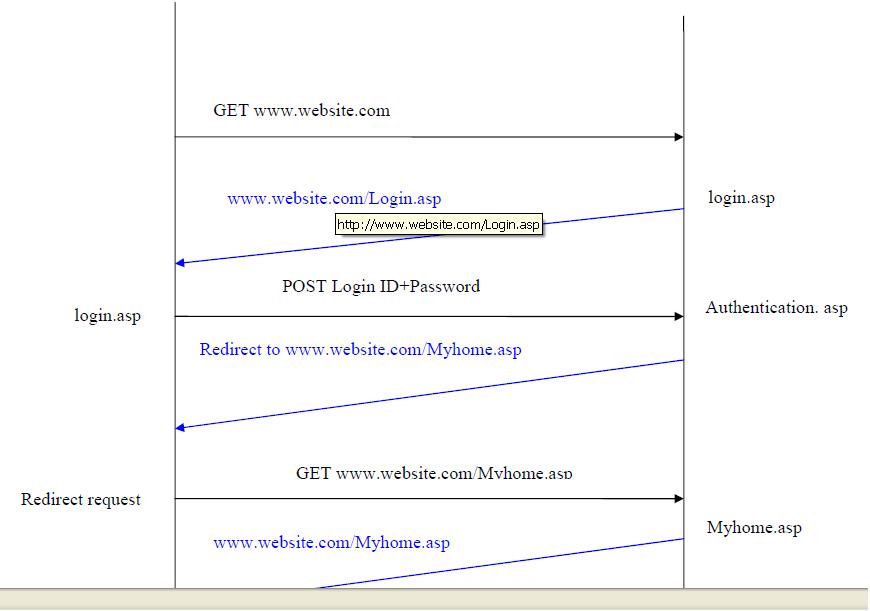
Stealing Password via Browser Refresh - OWASP

The browser’s back and refresh features can be used to steal passwords from
insecurely written applications.

Browsers have the ability to maintain a recent record of pages that were visited
by a user. The back and forward button on browsers use this functionality to
display the pages recently browsed. In addition browsers also keep track of
variables that were POSTed to the server while fetching the page.

Problem if you code like this


Solve


TIPS:-
1. Redirect
2. Clear Browser Cache [safer case]

vijay.dr
9842088860

Hit Counter


View My Stats